Rich Text Editing
Format text with bold, italic, underline, headings, lists, and colors.
Online WordPad is a free online text editor that works right in your browser. Create a document, format your text, and save your work in seconds — no installation and no sign-up needed.
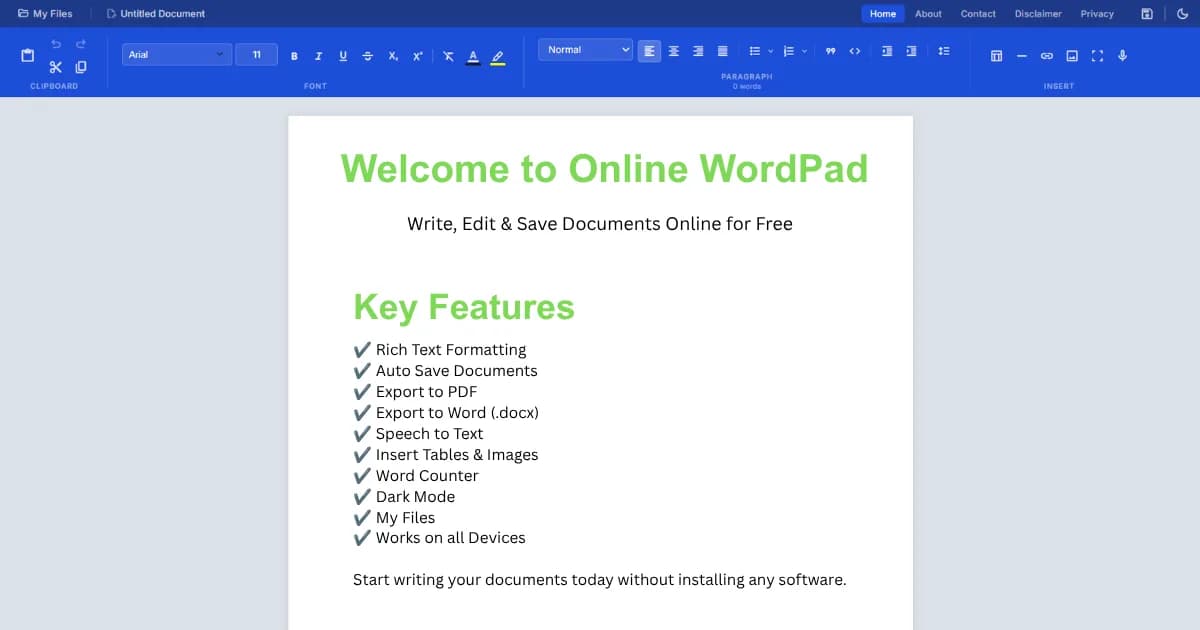
Trusted by students, writers, bloggers, professionals, and developers.
Everything you need to write documents online, in one clean workspace.
Format text with bold, italic, underline, headings, lists, and colors.
A familiar toolbar keeps every tool within easy reach.
Dictate your words and let the editor type them for you.
Save any document as a clean, ready-to-share PDF.
Download your work as a Word (.docx) file in one click.
Your document saves as you type, so nothing gets lost.
Insert, resize, and crop images right inside your document.
Add and edit tables with rows, columns, and resizing.
Switch to a dark theme for comfortable writing at night.
Track your word and character count while you write.
Keep your documents organized and easy to reopen.
Write smoothly on your phone, tablet, or computer.
A simple step-by-step path from blank page to finished document.
Visit the page in any browser. Your workspace loads instantly.
Start a fresh document with a single click.
Give your file a clear name so it is easy to find later.
Type your text just like in any word processor.
Apply headings, bold, lists, colors, and spacing.
Add tables, pictures, and links to enrich your document.
Speak instead of typing and watch your words appear.
Your changes save automatically as you work.
Download your document in the format you need.
Return later and continue from where you left off.
Online WordPad is built for one simple goal: make writing documents online fast, easy, and free for everyone. It works fully in your browser, so you can start typing the moment the page loads. There is no software to install, no account to create, and no waiting. Whether you need a quick note or a full report, this online text editor is ready when you are.
Write essays, assignments, and notes in a clean space. The word counter tracks length, auto save protects your work, and you can export to PDF or Word to submit right away.
Draft posts from any device. Format with headings and bold text, add images, then copy into your CMS or export for review — all without clutter.
Enjoy a calm, distraction-free space with professional formatting when you need it. Dark mode helps long sessions, and auto save protects every sentence.
Create worksheets, lesson plans, and handouts. Editable tables make schedules easy, and clean PDF export is ready for printing or sharing with a class.
Jot down notes, draft documentation, or format quick text. It loads fast, handles structured content well, and exports to text or Word for any workflow.
Prepare letters, memos, and reports without heavy software. Professional formatting and multiple export formats make sharing polished documents simple.
Write proposals, invoices notes, and drafts from anywhere. The responsive editor and My Files keep each client document organized and ready to reopen.
In short, Online WordPad brings the comfort of a classic word processor to the convenience of the web. It is free, fast, private, and simple — a dependable place to write documents online whenever inspiration strikes.
Save your work in the format that fits your needs.
Share polished, print-ready documents that look the same everywhere.
Download a Word file you can open and edit in any word processor.
Export clean plain text for simple, lightweight notes.
Open your free online WordPad and create your first document in seconds. No sign-up. No installation. Just write.
DisclaimerWe are not affiliated with Microsoft WordPad. Wordpad.co is an independent, educational, and user-helping tool for writing online.
Why people choose this online document editor every day.
Open it in your browser and start writing.
Every feature is free, with no hidden cost.
Runs on any modern browser, on any device.
Your work is saved as you type.
Lightweight and quick, even on slow connections.
Turn your voice into text hands-free.
Create clean, well-structured documents.
Easy on the eyes during long sessions.
Looks great on phones, tablets, and desktops.
Save as PDF, Word, or plain text.
Organize and reopen documents from My Files.
A simple, distraction-free writing space.
A quick look at how Online WordPad stacks up against a typical online editor.
| Feature | Online WordPad | Typical Online Editors |
|---|---|---|
| Auto Save | Yes | No |
| Speech to Text | Yes | No |
| Ribbon Toolbar | Yes | No |
| Image Crop | Yes | No |
| Editable Tables | Yes | No |
| Export PDF | Yes | No |
| Export Word | Yes | No |
| Dark Mode | Yes | No |
| Word Counter | Yes | No |
| My Files | Yes | No |
| Responsive Design | Yes | No |
| Rich Text Formatting | Yes | No |
| Fast Loading | Yes | No |
| No Installation | Yes | No |
| Clean UI | Yes | No |
Online WordPad is a free online text editor that runs in your browser. You can write, format, and save documents online without installing any software.
Yes. It is free forever, with no sign-up, subscription, or hidden cost. Every feature is available to everyone.
No. It works fully in your browser, so there is nothing to download or install.
No account is needed. Just open the page and start writing right away.
Your documents are saved locally in your browser, so your data stays private on your device.
Yes. Auto save keeps your document updated as you type, so you do not lose your work.
Yes. You can export as PDF, Word (.docx), or plain text, and you can also print directly.
Yes. You can dictate your content and let the editor type it for you.
Yes. You can add and edit tables, insert and crop images, and add links inside your document.
Yes. The editor is fully responsive and works on phones, tablets, and desktops.
Yes. You can switch between light and dark mode with one click.
Yes. Your files are stored in My Files, so you can reopen them anytime.